UpdraftPlus
Back up, restore and migrate your WordPress website with UpdraftPlus
UpdraftPlus backs up all of your data in normal zip files, including your database. Your database backup is a regular SQL file that can be used anywhere.
Go to UpdraftPlus >> Backup / Restore >> Existing backups and click to download the database backup.
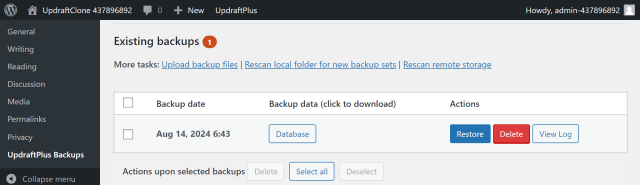
Locate your downloaded file and unzip it to view its contents.
Yes, your hosting provider will usually provide a database manager such as phpMyAdmin. If your database has not been encrypted you can import the file directly.
Note: Some versions of phpMyAdmin may require a slightly different filename ending in db.sql.gz, in this case you can simply rename the file to match the required naming pattern.
Try Dev Server’s full suite of WordPress plugins.
Back up, restore and migrate your WordPress website with UpdraftPlus
Speed up and optimize your WordPress website. Cache your site, clean the database and compress images
Secure your WordPress website. Comprehensive, feature rich and easy to use
Centrally manage all your WordPress websites’ plugins, updates, backups, users, pages and posts from one location
Privacy-friendly analytics for your WordPress site. Get insights without compromising your visitors’ privacy